Prompt Drops
Share:
Copy link
Copied!
The first time I asked Claude to draft a variance commentary in our company voice, it came back competent and unmistakably not ours. Wrong turns of phrase. Generic fonts on the chart it embedded, and a tone that could have belonged to any Fortune 500. So I pasted in an example memo and tried again — better. Then I did it again the next session, and the one after that, re-uploading the same three files and re-explaining the same five rules each time, correcting the same drift on repeat.
The fix isn't a longer prompt. It's a skill — a permanent instruction file that carries your company's brand and voice into every future conversation, without you re-uploading anything.
This is a guide to building one from scratch. It assumes you're new to Claude, work somewhere with a real brand system, and have the assets on your laptop right now.
What a skill actually is
A skill is two things: a SKILL.md file that tells Claude when to activate and how to behave, and a folder of reference assets — real logos, real templates, real example documents — that it points to. You upload the folder once, and from then on Claude reads the rules and treats the assets as source of truth whenever the skill triggers.
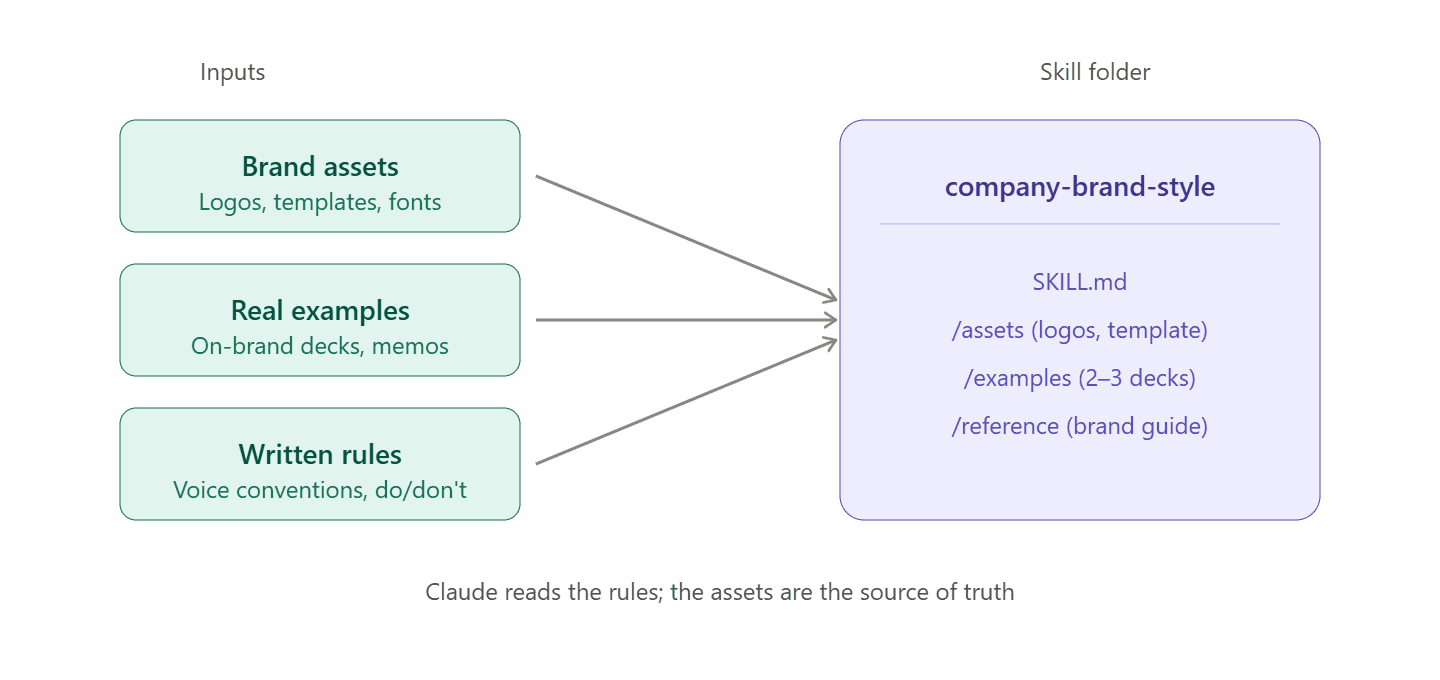
Rules alone won't get you there. "Our primary color is deep navy" isn't the same as #142A52, and neither is the same as a .potx template with the theme baked in. Every rule Claude has to interpret is another chance for drift, and files are what remove the interpretation.
What you need to gather
Fifteen minutes of collection before you open Claude. Pull the following into one folder:
Two or three real, on-brand decks. Recent, ones you'd send to the CFO. Not blank templates — actual finished work.
Two or three real documents. A memo, a board write-up, a variance commentary — whatever shows the writing style in the wild.
Your logo files. SVG or PNG masters, transparent background, light and dark versions if you have them.
The brand guide PDF, if marketing publishes one. Don't stall on it if they don't (most brand guides are more decorative than diagnostic anyway).
The
.potxand.dotxtemplates, if IT or marketing maintains them. These are gold — theme colors, master slides, heading styles all baked in.A list, in your own words, of five things that are unmistakably your company's voice. "We never use 'utilize.'" "We open decks with a single-line thesis, not an agenda slide." "En-dashes, not em-dashes." Five is enough.
That last one matters more than it looks. Nobody at your company has written this list down. You know the rules because you've been corrected on them.
The prompts
Three prompts, run in sequence, each doing one job. Don't collapse them into one.
Prompt 1 — Extract the style specs
Start a new conversation. Upload the decks, documents, brand guide, and templates. Then paste this:
I'm building a reusable style guide for our company brand. Attached are real decks and documents that are on-brand for us, plus [our brand guide / no brand guide — work from the files].
Extract everything a designer or writer would need to reproduce this style from scratch. Be specific and use exact values wherever possible:
Primary, secondary, and accent colors, as hex codesFonts used for titles, headers, and body textLogo placement rules and clear spaceSlide layout patterns (title zone, footer, page numbers, common section types)Document formatting (margins, heading styles, paragraph spacing)Recurring phrases, sentence patterns, and structural conventions in the writingAnything that reads as "we always do this" or "we never do this"
Return this as a structured list. Where you're inferring rather than reading from the source, mark it clearly. Don't guess at hex codes — sample from vector files where possible.
What comes back is a first-draft spec, half of it right and half of it needing correction. Colors sampled from PDFs will drift, and inferred voice rules will read generic. Fix all of it in the same conversation before you move on, because the skill is only as good as the spec it's built from.
Prompt 2 — Draft the skill file
Once the spec is clean and you agree with what's in it:
Now turn this into a Claude skill file (SKILL.md) that I can upload once and use across future conversations. It should:
Include YAML frontmatter with a clear name and a description that tells Claude to activate whenever I'm creating a deck, memo, document, or any deliverable that will go out under our company brandCodify the colors, fonts, layout, and logo rules exactly as we agreed aboveCodify the voice and writing conventions with concrete "do this / not this" examples pulled from the real documents I uploadedList common failure modes (generic language, wrong shade of blue, missing footer, boilerplate consulting phrases) so future sessions catch themReference the assets folder for anything that lives as a file rather than a rule — logos, templates, example documents
Write it so a person reading it understands it, not just a model parsing it. Include a short worked example at the end showing an on-brand paragraph next to an off-brand version.
Skim the output, and replace any rule that reads generic — "clear and concise," "professional tone" — with a specific pair from your source docs. Generic rules do no work.
Prompt 3 — Stress-test it
This is the step most people skip, and it's the one that separates a skill that mostly works from one you can actually trust.
Open a fresh conversation, upload the skill folder, and give Claude a real task — something you'd assign to a junior analyst:
Draft a one-page executive summary of [pick a real internal topic — a variance, a business review, a market update] using our company style skill.
Then compare the output to a real on-brand document, side by side. Where it drifts, note the specific gap: "used 'utilize' instead of 'use,'" "logo missing from bottom-right," "wrong shade of navy — got #1B3A6B, should be #142A52," "opened with an agenda slide when our decks always open with a single-line thesis."
Feed each miss back into the SKILL.md as an explicit rule, with the wrong version and the right version side by side. That's how the skill sharpens.
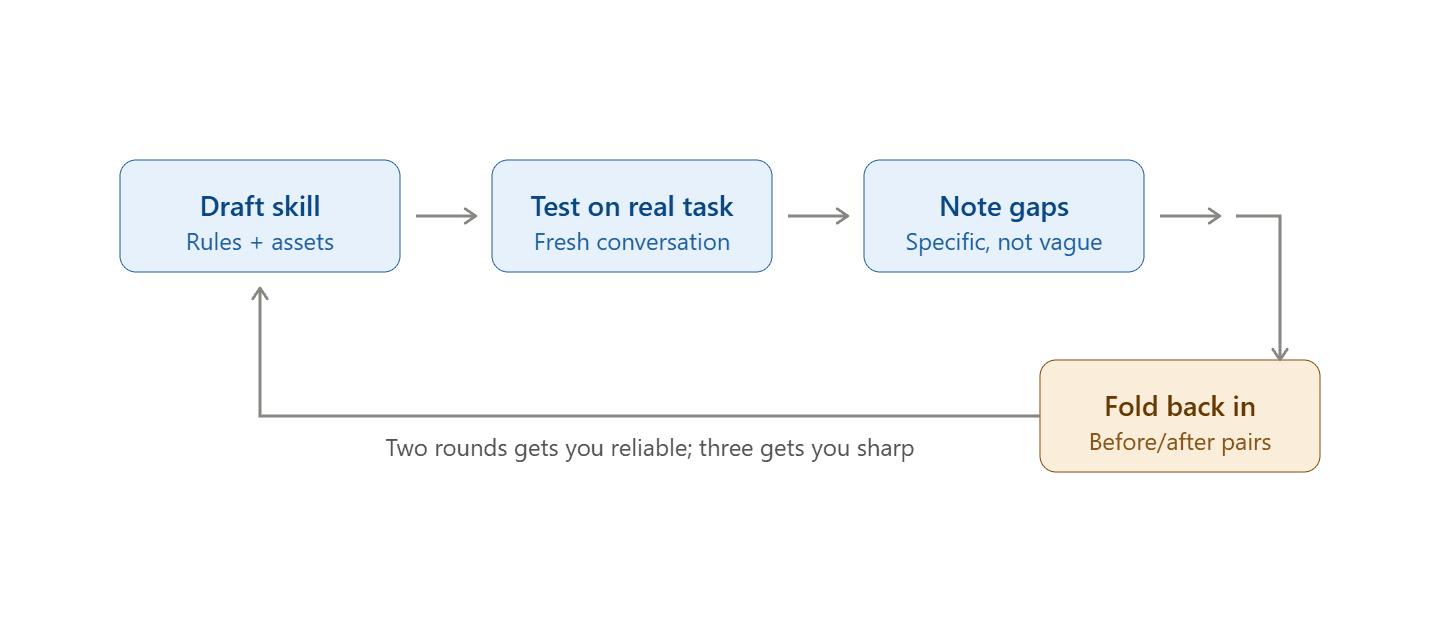
Two rounds of this and the skill holds up on most work; three and it gets genuinely reliable. The file grows every cycle, but only with corrections grounded in specific misses — never abstractions, never aspirations.
Common errors, and how to fix them
Colors come back a few points off. Antialiasing on rasterized screenshots pulls sampled hex codes off true, so your #142A52 comes back as #1B3A6B. Marketing has the real codes, so ask them; if they can't help, sample from the SVG logo rather than a deck screenshot.
Fonts look wrong in Claude's preview. The preview environment substitutes fonts it doesn't have installed, and those substitutes have different character widths — text that fits your title box in preview can overflow in the real file. Know which fonts are safe (Calibri, Arial, Cambria, Times New Roman) and which aren't, and for anything outside that set, ignore the preview's text-fit and trust the file on your machine instead.
The voice section reads generic. Rules like "clear and concise" or "professional tone" don't move anything. Replace every abstract rule with a specific "we write X" and "we don't write Y" pair, pulled from your real documents — five concrete pairs beat twenty adjectives. If you can't point at a real sentence from a real memo, the rule isn't a rule yet.
The skill triggers on things it shouldn't. You ask Claude to summarize a Slack thread and it opens with your corporate footer. Tighten the description in the frontmatter, naming the deliverable types explicitly — "decks, memos, board documents, external-facing summaries" — rather than "any writing task." The description is what Claude reads to decide whether to activate, so keep it narrow.
Logo shows up in the wrong place. Placement is hard to specify in prose, so reference a specific slide in one of your uploaded examples instead: "logo appears bottom-right at 40px height, matching slide 2 of the template." Anchoring to a real artifact holds where an abstract description won't.
Later versions drift toward vague rules. After a few refinement cycles, the file starts abstracting upward — specific misses get paraphrased into general principles and lose their teeth. Every correction added to SKILL.md should keep the before/after pair that motivated it, permanently. Don't paraphrase a real miss into a rule about tone, or you'll lose the thing that made the correction work in the first place.
New decks come back without the template baked in. If Claude builds a .pptx from scratch instead of starting from your .potx, the theme colors, master slides, and heading styles the template was carrying all disappear. Tell the skill explicitly: "when generating a PowerPoint, always start from /assets/company-template.potx and add slides to it; never build from a blank deck."
The honest scope
This won't fully automate your deck production. What it does is remove the blank page: first drafts come back closer to on-brand, and the corrections you're making are the meaningful ones — missing analysis, wrong framing — not "please change the font" for the fourteenth time. That's a real compression, and the judgment calls that carry your name are still yours.
Fifteen minutes of collection, three prompts, two rounds of testing — and it compounds on every deliverable after that.
Published: