101s
Share:
Copy link
Copied!
Someone in a finance ops Slack channel asked me last week which AI tool their team should standardize on. I started typing "it depends" and stopped, because that answer is true and completely useless to someone with a budget line to fill. So I mapped it properly — and then two more pieces of research landed on my desk that changed the shape of the answer. One showed a spreadsheet-level challenger to Copilot I hadn't accounted for. The other showed that Perplexity's agentic product is a lot more capable, and a lot more specific, than "does research well." And underneath the whole comparison sits a layer I'd skipped entirely: the AI that's already embedded inside the ERP and planning systems themselves.
The headline hasn't changed: there isn't a best platform, there's a best platform per job. What's changed is how many jobs there actually are.
Before we move ahead: This is meant to be rather short to-the-point comparison summary — not an exhaustive deep dive into each product.
Stop asking which one wins
The four general-purpose platforms still aren't competing for the same seat. Copilot lives inside Excel, PowerPoint, and Outlook. Perplexity is built around citation-backed research with finance-specific data sources wired in. Claude and ChatGPT both do general reasoning, in opposite directions — Claude's edge is long-context conservatism, ChatGPT's is breadth and coding. What's new is that two of those platforms now have specialist extensions punching into a more specific job than the parent product, and there's a layer beneath all four that most comparisons skip: AI embedded directly inside the systems of record.
Most finance teams occupy the top three layers already, with different tools. The fourth is new territory for most people reading this, and it matters more than it looks.
Where each platform actually wins
ChatGPT remains the most flexible general-purpose tool of the four, earning that almost entirely through coding and ecosystem breadth. Plus, Pro, Business, and Enterprise tiers ship Projects, custom GPTs, Deep Research, and the strongest code generation of the group — Python, SQL, VBA, Office Scripts — now on GPT-5.x/5.6-generation models. It's the natural home for a script that refreshes a reporting package or a custom GPT that reviews contract terms against your standard playbook. Native Microsoft 365 and Google Workspace integration stays weaker than Copilot's, and there's no first-party computer-use product — "agents" here mean code plus APIs plus your own orchestration.
Pricing runs Free and Go (~$8/month) through Plus ($20), Pro ($100–200), Business (~$20/user/month annually), and custom Enterprise, with Business and Enterprise excluding your data from training and adding SSO, SCIM, and data residency.
Marketed as an all-purpose autonomous analyst, ChatGPT is an excellent thinking-and-coding partner that still needs a human owning every assumption and every final number. He’s kinda like the Quant Analyst from the Big Short (He won a national math competition in China).
Claude is the one you reach for when the source material is long, dense, and consequential — a credit agreement, a 10-K, a 100-page CIM. The 3.5/4.x Sonnet and Opus models carry large context windows and a conservative tone that reads like a second-year associate double-checking the contract, not an MBA associate drafting their first slide. It's weaker on native Microsoft 365 integration, and the surrounding ecosystem is thinner than OpenAI's — but that gap has narrowed now that Claude has its own Excel add-in (more on that below). On security, Claude has been adding enterprise connectors fast — more than 28 as of mid-2026 — plus self-serve HIPAA configuration with BAAs.
Pricing: Pro and Team for individuals and small teams, Enterprise around $30/user/month.
The marketing pitch is Claude operates as a careful AI teammate that understands your documents deeply; the reality holds for reasoning, with the caveat that "teammate" behaviors are still semi-structured. As with any rockstar associate, they’re capable out the gate, but they need context and training to really be used
Perplexity is the research layer, and it's not close. Citations by default, real-time web access, and finance-specific data integrations (Morningstar, EDGAR, Crunchbase, FactSet) make it the tool for benchmarking margins, pulling public comps, or collecting the info for a company brief the night before a partner meeting.
Individual pricing is Free, Pro at $20/month, Max at $200/month; Enterprise runs roughly $40/user/month for Pro and $325/user/month for Max.
Think of Perplexity as the Wharton intern who has access to all the research tools through their school email and spends every second of their summer building highly detailed research reports.
Perplexity Computer, which is a genuinely different kind of product than "Perplexity with extra steps" — has its own section below. Spoiler, it’s one of my favorite tools.
Microsoft 365 Copilot wins the moment your work lives exclusively inside Excel, PowerPoint, and Outlook, because it's the only one of the four actually embedded there. It inherits your organization's existing identity and permissions through Entra ID. External research and citation depth trail Perplexity, and reasoning on genuinely complex documents isn't clearly ahead of Claude or ChatGPT.
List pricing sits around $30–32/user/month, with M365 E3 and E5 rising in July 2026 to roughly $39 and $60/user/month.
Marketing sells it as a ubiquitous AI colleague; in practice it's a genuinely useful in-suite assistant that still misreads complex models often enough that it's not a substitute for someone who understands FP&A.
Set the four side by side on the dimensions that matter most for finance work and the split gets sharper.
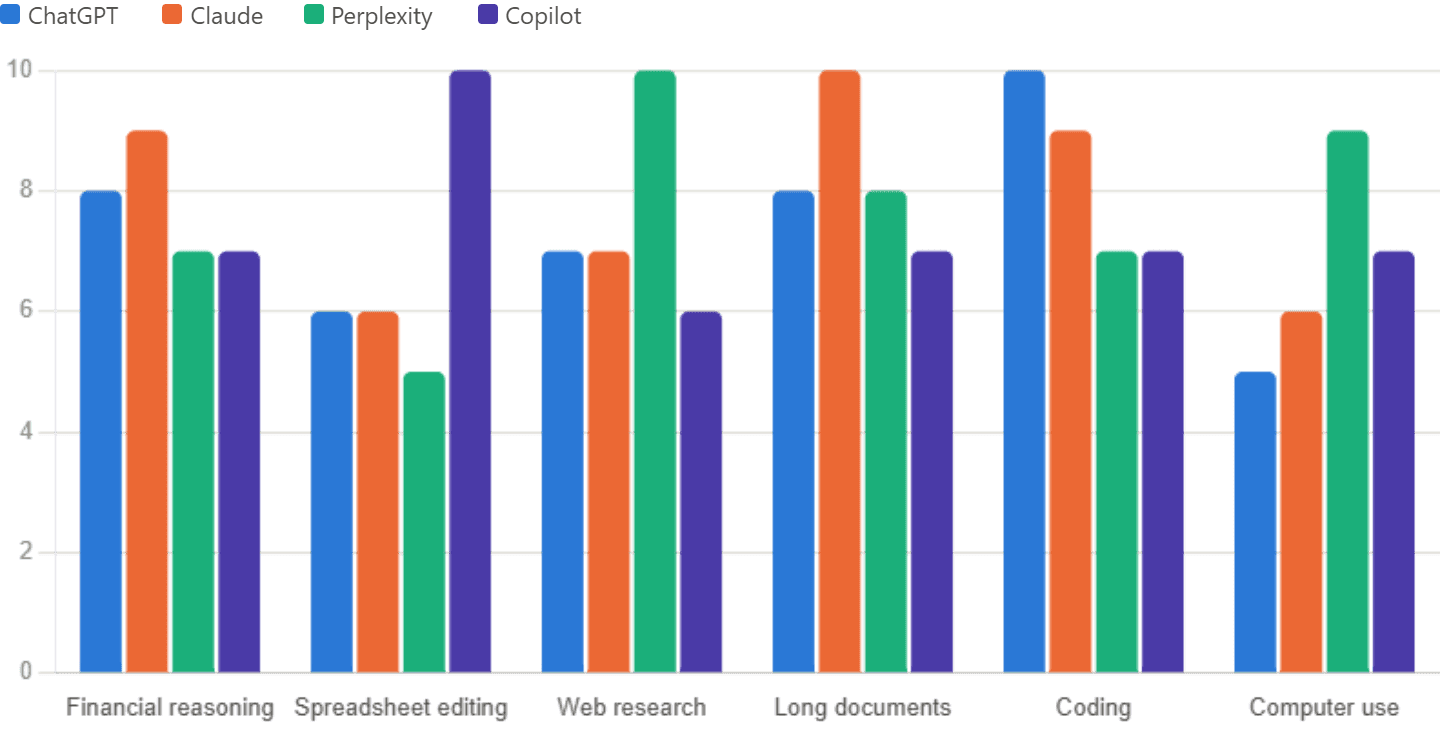
The spreadsheet fight nobody saw coming
Claude for Excel is an add-in that reads multi-tab workbooks, understands formulas and cross-tab relationships, edits in place, and explains its work with references to specific cells and ranges. It requires a paid Claude plan — Pro, Max, Team, or Enterprise; the free tier doesn't get it.
Set it next to Copilot in Excel and the split is clean rather than competitive. Claude for Excel is optimized for analytical depth: formula debugging, logic validation, catching things a fast pass would miss. Copilot in Excel is optimized for productivity and breadth: summaries, charts, what-if analysis, running inside your existing data connections and enterprise permissions. Claude for Excel has no reach into macros, Power Query, or Power Pivot, and no visibility into Teams, SharePoint, or Outlook — it's a spreadsheet-only assistant, deliberately narrow.
One real constraint worth flagging for a regulated shop: your file goes to Anthropic through the add-in, subject to your plan's privacy tier — a Team-or-Enterprise decision for anyone with data governance obligations. The realistic setup for a serious FP&A or deal-modeling shop isn't picking one of these — it's Copilot for the connected, everyday productivity work and Claude for Excel on the machines of whoever actually owns the models.
Perplexity Computer, properly understood
Computer orchestrates more than 19 underlying models — Claude as the core reasoning engine, alongside GPT, Gemini, and others — behind a single prompt, and it can actually operate a browser: seeing a UI and issuing clicks, typing, scrolling, uploads and downloads. Runs persist as "projects" with memory across sessions, and it connects into hundreds of SaaS tools, chaining them — research into model into slides into an emailed summary — in one pass. It's currently available to Perplexity Max subscribers, with Enterprise Max support rolling out; Computer for Professional Finance adds licensed data provider integrations on top.
Four workflows show what that buys you. Earnings and industry monitoring: pull the latest 10-Qs and transcripts for a coverage list, extract figures into a structured table, draft a one-page summary that can go out over an email connector — with a human still checking every metric. Deal and IC prep: given a target and a brief, it researches competitors, pulls comparable transactions, and starts an IC memo draft, with a human owning the final valuation. Market and pricing research: parallel searches aggregated into tables and narrative, optionally drafted into a strategy document. Recurring briefs: a standing "weekly market update" project that re-runs with minimal re-prompting.
I’ve personally used Computer to translate my excel models into live, editable dashboards that enable our CFO and Head of Strategic Finance to run scenarios. I’ve even created a HQ for our sales reps to log in with a password, generate pricing proposals, send one-off requests to our GTM team, and much more. The UI is incredible and miles ahead of any AI Tool I’ve tested. The ability to generate live dashboards and shareable, editable views to anyone makes Perplexity Computer a must have for anyone in finance.
The limitations matter as much as the capability. UI fragility is real — any change to a target web app's layout can break a longer workflow. It's technically capable of touching browser-based ERPs and CRMs, but that's a risk you don't take; restrict it to read-only and draft-generation, never posting entries or approvals. It still inherits the hallucination risk of the models underneath it, and repeated analysis needs standardized documentation for audit purposes.
Positioned honestly, Computer is the most advanced general-purpose tool available today for research and content workflows — but it’s still not something you point at your systems of record without guardrails.
The wider landscape
Beyond the four platforms and their two specialist extensions, there's a tier of AI that doesn't compete with them so much as sit in a different place in the stack — either an alternative for a different core suite, or AI embedded natively inside a specific finance system, or infrastructure you'd build a custom copilot on top of. None of these score on the same axes as the chart above, so here's the honest version: a color-coded map of where everything sits, not a forced ranking against tools that aren't doing the same job.
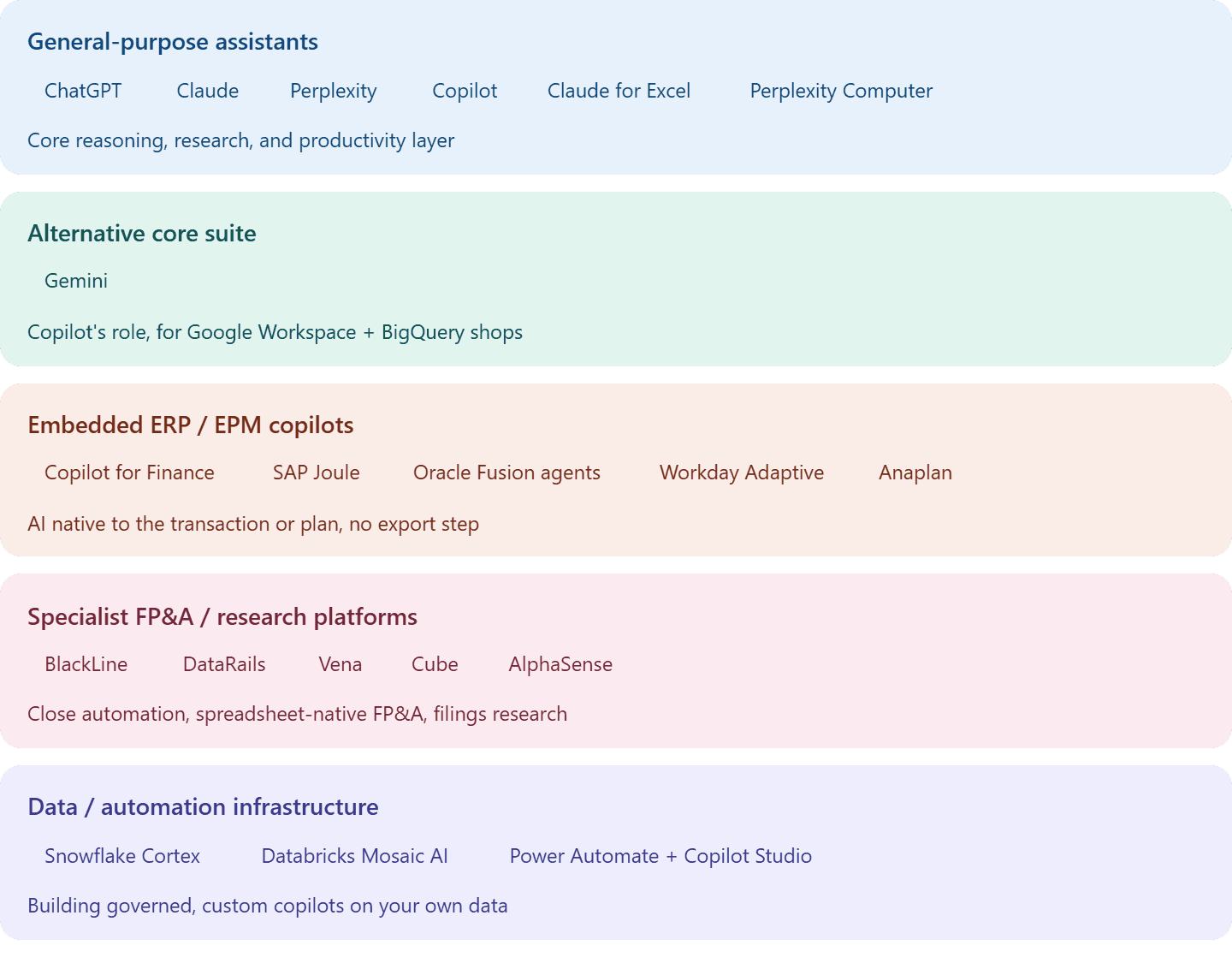
A quick note on each category. If your organization runs on Google Workspace and BigQuery rather than Microsoft 365, Gemini plays roughly the role Copilot plays for Microsoft shops — building formulas and charts in Sheets, drafting in Docs and Slides, generating SQL in BigQuery. The embedded ERP and EPM copilots see your data without an export step, which also means they only matter if you're standardized on that particular system: Microsoft Copilot for Finance sits closer to the transaction than the general Copilot (AR/AP, reconciliations, collections drafting); SAP Joule does the equivalent inside S/4HANA; Oracle Fusion runs gen-AI agents for document capture and anomaly detection aimed at touchless finance; Workday's Illuminate AI and Anaplan's PlanIQ bring driver-based forecasting directly into connected planning models. The specialist platforms are narrower still — BlackLine for close and reconciliation matching, DataRails, Vena, and Cube for spreadsheet-native FP&A, AlphaSense as a direct Perplexity competitor for filings and transcript research specifically. And the infrastructure layer — Snowflake Cortex, Databricks Mosaic AI, Power Automate plus Copilot Studio — only matters once you're building a custom workflow rather than buying one off the shelf.
None of this replaces the four-platform decision most people reading this actually face. It's the next question, for whoever's already standardized on a specific ERP or ready to build something custom.
Matching the workflow to the tool
For monthly budget-versus-actual work, Copilot does the mechanical refresh while Claude or ChatGPT — or now, Claude for Excel directly in the sheet — gets a diagnostic pass on whether the drivers still hold up. Annual planning runs the reverse: Claude or ChatGPT leads on scenario architecture and narrative, Copilot handles the in-sheet build and deck production once numbers are set. Board decks and variance commentary follow the same pattern — Copilot drafts inside the actual PowerPoint, Claude or ChatGPT handles the denser executive narrative a formula can't write. Research-heavy work flips the primary entirely: investment research and market benchmarking lead with Perplexity, Computer for the recurring version, with Claude or ChatGPT digesting whatever comes out into a thesis. Model review is now a genuine two-tool choice inside Excel itself — Claude for Excel for formula-level QA, Copilot for everything connected to the rest of the suite.
None of that replaces judgment. Every workflow in this comparison, from a five-minute variance note to a full investment memo, carries the same closing line: a person still owns the number.
Published: