101s
Share:
Copy link
Copied!
I went looking through my own Claude history last week and found four conversations I'd basically already turned into tools without knowing it. Long back-and-forths where I'd hammered something into the exact shape I wanted, then walked away and re-did the whole negotiation the next time I needed it. That's the quiet tax most people pay with Claude — re-explaining the same preferences, pasting the same context, rebuilding the same output from scratch every single time. Skills are how you stop paying it.
You write the instructions once. Claude holds onto them and fires them automatically whenever they're relevant. It's arguably the biggest single unlock in the whole product — and there's one step in building them that almost everyone skips (we'll get there).
What a skill actually is
The cleanest way to think about a skill is a recipe card for a workflow: a set of instructions and context that tells Claude exactly how to do a specific task the same way every time. Take anything you run through Claude regularly — answering emails, building decks, writing reports. Normally you respell the details on every pass: what tone, what format, what to include. A skill captures all of it once. From then on Claude lands the same quality on the first try, no long prompt required.
Skills also travel. They work across chat, Cowork, and Code, and you can carry them to other tools — Hermes, Codex, Manus. Wherever you're working, the skill comes with you.
Under the hood it's deliberately unglamorous: a skill is just a markdown file, plain text Claude knows how to read, with the instructions baked in. The more advanced ones pull in extra files too — more markdown, or images and PDFs that hand Claude visual guidelines and additional context to execute cleanly.
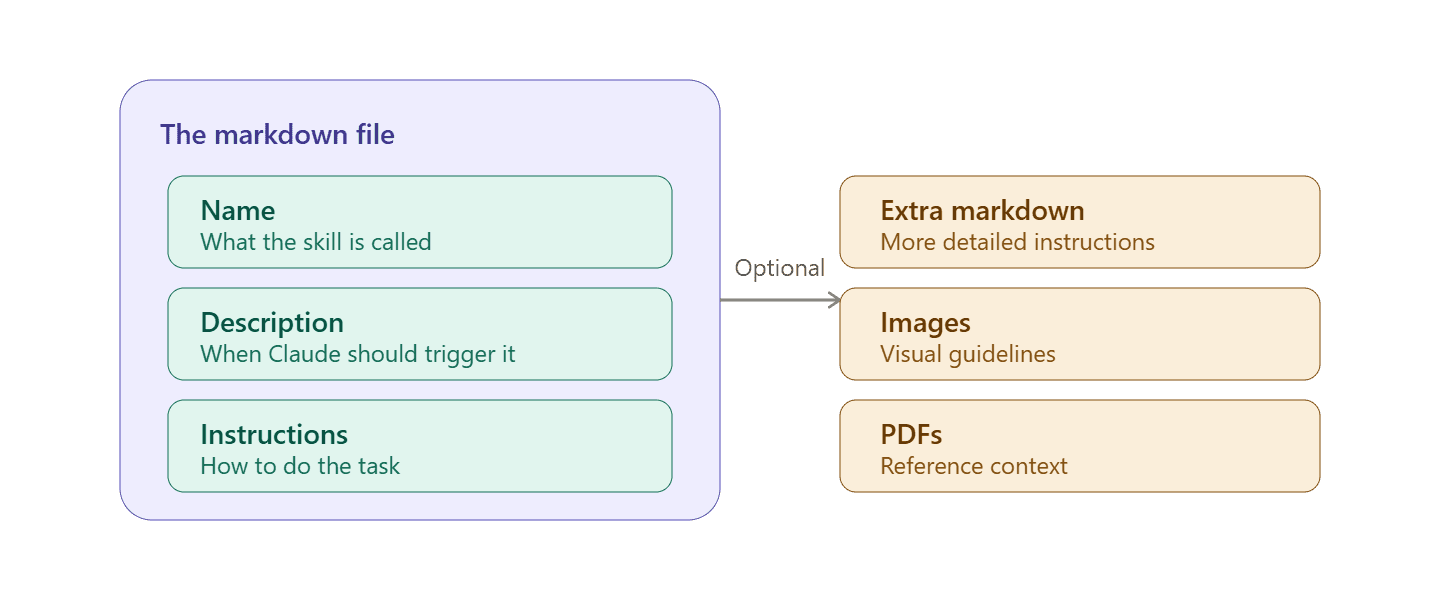
Because it's just text and attachments, a skill is portable, inspectable, and trivial to share — which matters later, when we get to installing ones other people built.
The one setup step
Before any of this works, there's a single switch to flip. Go to settings, then capabilities, and confirm code execution and file creation is on — skills won't run without it. For most people it's enabled by default, so this is usually a quick check rather than a change.
The skills you already have
Claude ships with built-in skills, and the fastest way to understand them is to watch one fire. Ask Claude to make a PowerPoint and it triggers the PowerPoint skill on its own — no extra instructions — and hands back a formatted, editable deck on the first try. Same for spreadsheets, Word documents, PDFs, and data analysis; there's a built-in skill for each.
Beyond the defaults there's a growing library. Under customize, then skills, then browse, you'll find additional skills from Anthropic — click the plus to add any that fit how you work. One level up sits plugins, which bundle several skills together with connectors that let Claude reach external tools, all in one package. Anthropic offers built-in plugins for productivity, sales, finance, legal, marketing, and more, and a partners tab holds plugins built for products you may already use — Canva, Zapier, Airtable and the like — each wiring that tool more deeply into Claude.
The four ways to get a skill
Between what ships built in, what you browse, what you build, and what you download, there are four distinct paths to any skill — worth seeing side by side before we dig into the one that matters most.
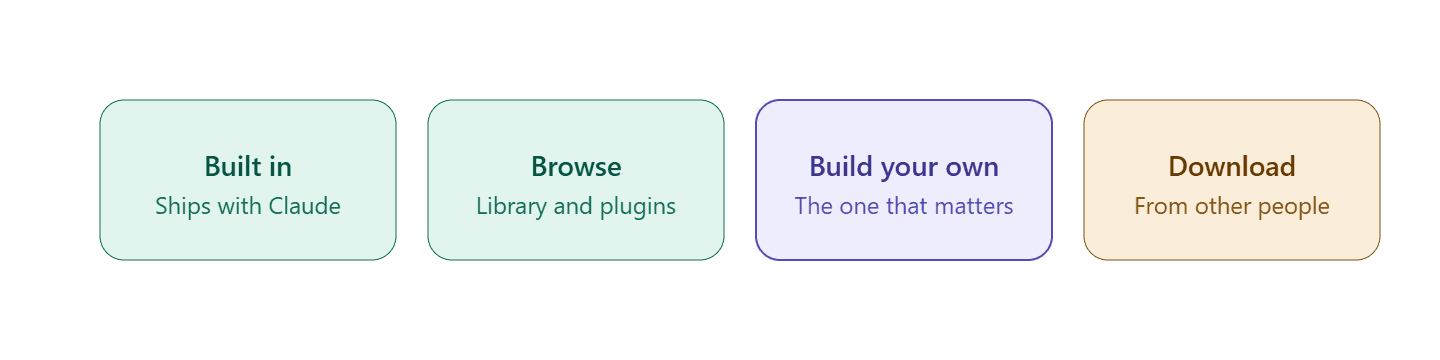
The pre-built skills and plugins cover a lot. But eventually you'll want something specific to how you work — and that's where building your own comes in.
Building your own — the right way
There's a create-a-skill button that lets you describe what you want, but that's not the recommended starting point unless you've already thought the whole thing through and have a solid prompt ready. The better approach is more natural: use Claude the way you normally would on an actual task. Tell it what you want, go back and forth, tell it what's right and what's wrong, iterate until the output is exactly where you want it. Then say "package everything we just did into a skill." Claude has a built-in skill creator that reads the whole conversation and distills it into a reusable process. Next time you need that task, you hit the same result on the first try.
Which means a lot of people are sitting on skills without realizing it. If you've used Claude for a while, you almost certainly have conversations where you ground something into shape over several turns — you can reopen any of those and ask Claude to package it up. (I found four in an afternoon.)
To make it concrete, take one of the most-requested skills: writing in your own voice — social posts, blogs, marketing copy, scripts. Out of the box Claude is good but not great at this, and no AI is, but the right skill gets it much closer. Start by pasting in several writing samples and asking for an analysis; it comes back deep and specific. Then ask Claude to interview you — a run of questions about how you think, what you care about, how your sentences move, what you'd never say — continuing until it's confident it can replicate your style. Answer thoroughly, and at the end say "package this up as a skill." The skill creator works through everything you covered and produces the skill, which you save. From then on it triggers automatically, and you'll find it under customize, in your skills, showing everything Claude went through and everything it landed on.
The step most people miss: refine it
Saving the skill is not the finish line. This is exactly where most people stop short.
Test it. Look at what it produces, critique it, tell Claude what's good and what's bad, ask it to update the skill on that feedback. A more nuanced skill like voice-matching won't be all the way there on the first pass — the skills that become genuinely powerful are the ones you keep refining.
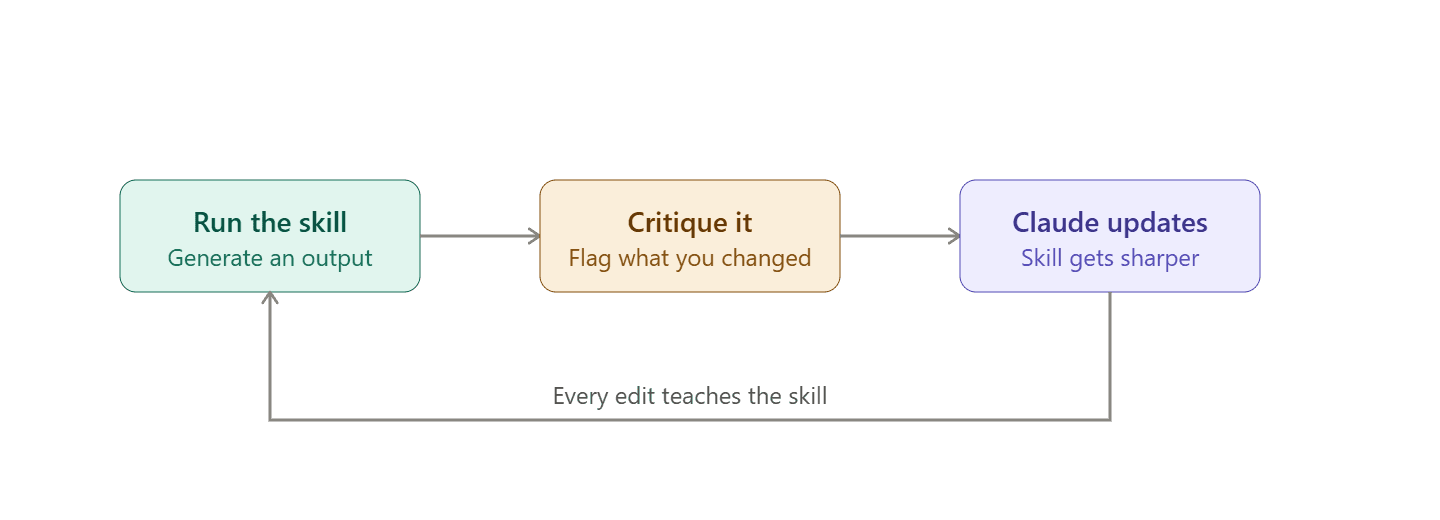
Make it a habit: every time you tweak an output from a skill, tell Claude what you changed and ask it to fold that back in. Do that consistently and, over time, you build a system that handles more and more of your work exactly the way you'd do it yourself.
Downloading skills — and doing it safely
Because a skill is just a file or a folder of files, sharing is trivial: come across one someone built, drop it in, done. You'll find them on GitHub, in marketplaces, handed out in videos — anywhere there's a file to grab. To install one, go to customize, then skills, click add, then upload skill, and drop the file in.
That ease of sharing carries a real risk, and it's worth taking seriously. A skill is a set of instructions, which means a malicious one could tell Claude to ship your data somewhere without you knowing. And if you're running skills in Cowork or Code, those can touch files directly on your machine. So the rule for anything from an outside source is simple: confirm it's from someone you trust, and always look inside before installing.
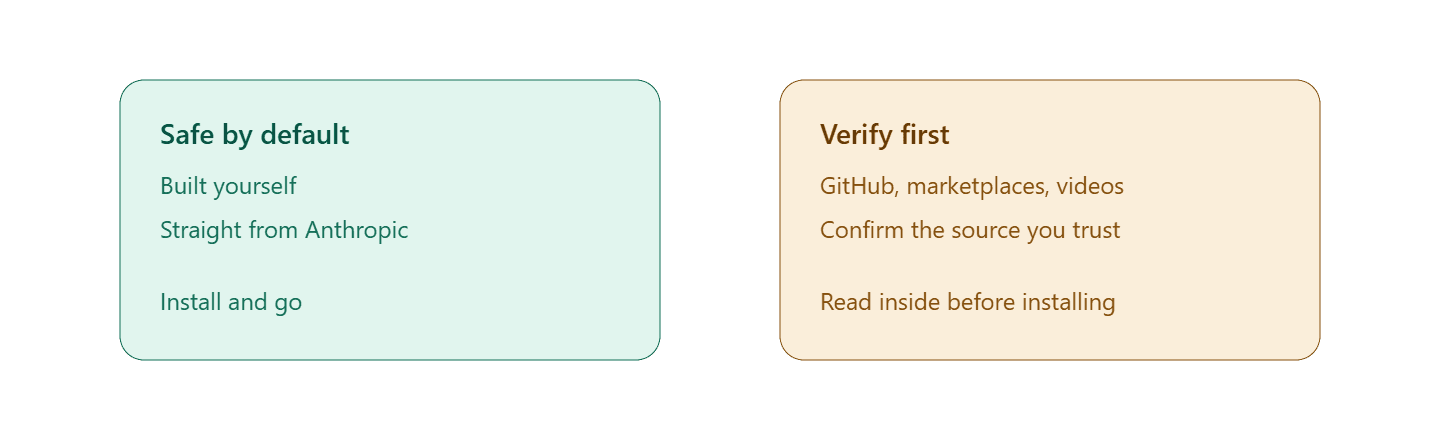
Skills you built yourself or that come from Anthropic are safe by default. Everything else earns a verification pass before it goes anywhere near your data or your machine.
Where to start today
Skills turn Claude from a tool you have to constantly steer into a system that works automatically, consistently, and better over time. The easiest way in is to mine what you already have: scroll back through your conversations, find one where you already went back and forth to get something right, open it, and say "package everything we did here into a skill." That's the whole move — and you've just saved yourself that work forever. No conversation like that yet? Pick one thing you do regularly and wish you had help with, work it until it's right, then package it up. Either way, once you've got a single skill that runs the way you want, the appeal stops needing explanation.
Published: